


General Internet Safety
TODAY’S CONNECTED WORLD
Internet access is an important part of modern education. It provides students with access to instructional materials, communication tools, research resources, and approved digital services. It can also expose students to inaccurate, distracting, inappropriate, or harmful content.
Washington County School District therefore combines internet filtering, grade-appropriate access, active supervision, digital citizenship instruction, parent visibility, and intervention when technology is misused.
WHAT DOES WASHINGTON COUNTY SCHOOL DISTRICT DO?
Washington County School District uses a layered approach to student internet safety that combines prevention, supervision, education, visibility, and remediation. Technology-based filtering is used to restrict access to inappropriate or harmful material, while teachers, school staff, and parents provide the supervision necessary to help students use technology safely and appropriately.
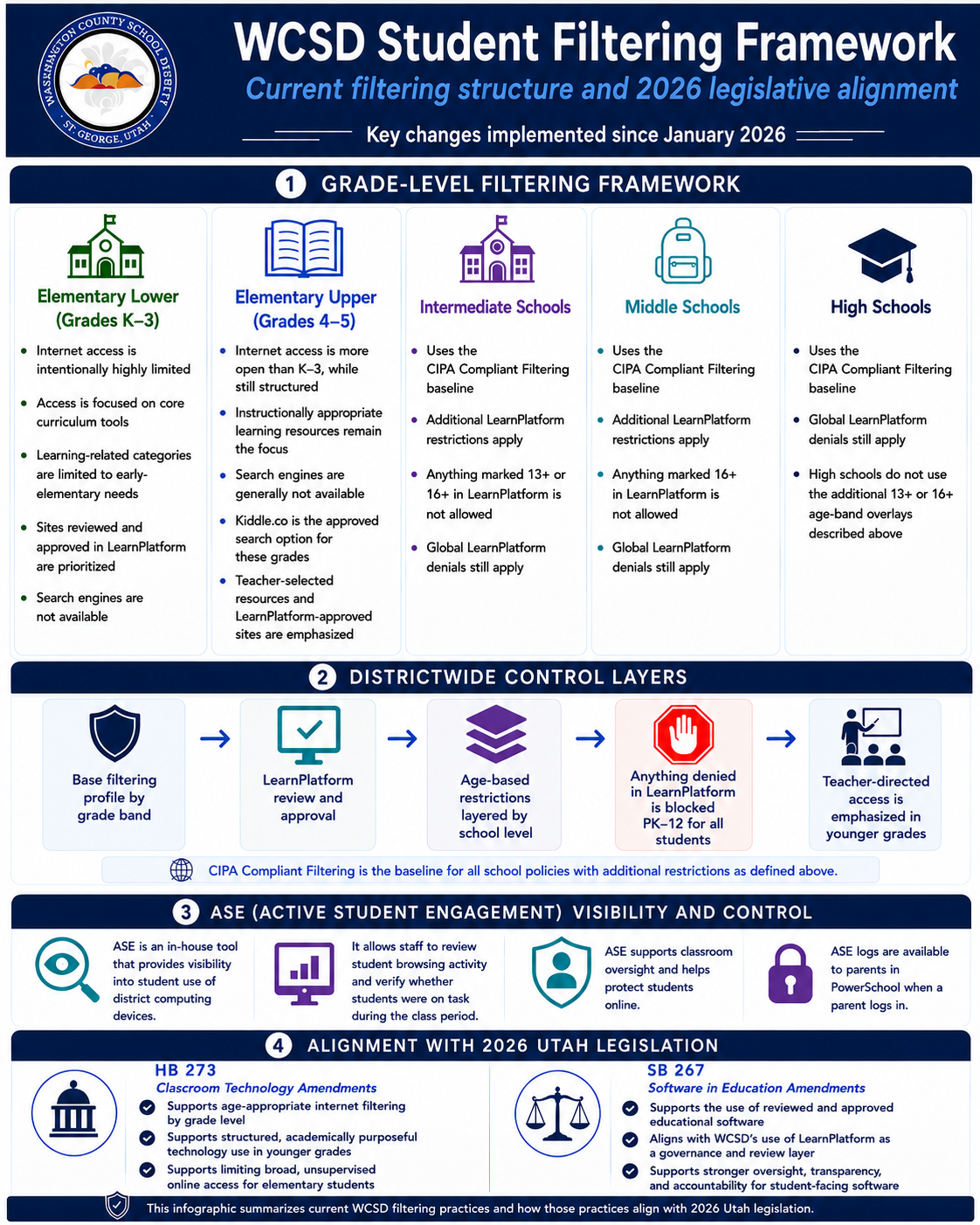
WCSD STUDENT FILTERING FRAMEWORK
CIPA-compliant DNS filtering is the baseline layer for all school filtering policies. On District-owned student devices, cloud filtering is layered on top of that DNS baseline and provides additional protections that DNS-only filtering cannot provide.
The baseline of cloud filtering blocks the same sites as the CIPA-compliant DNS filtering layer. Cloud filtering also provides deeper protection on District-managed devices by decrypting traffic where appropriate, performing deeper analysis, and looking for keywords or other inappropriate content that the system is able to identify.
Additional restrictions are then applied based on student grade level, developmental appropriateness, device type, LearnPlatform review status, and the instructional purpose of the technology.
- Kindergarten through Grade 3: Internet access is highly limited. General internet search is not available, and students are limited to approved websites, applications, and instructional resources.
- Grades 4 and 5: Students have access to a broader set of approved educational resources. Kiddle.co is the approved search option for these grade levels.
- Intermediate Schools: Access is expanded for age-appropriate instructional use. Digital products identified as 13+ or 16+ in LearnPlatform are not permitted for intermediate school students.
- Middle Schools: Access is broader than intermediate school access, but remains filtered and structured. Digital products identified as 16+ in LearnPlatform are not permitted for middle school students.
- High Schools: Students have broader access to approved instructional resources, subject to CIPA-compliant DNS filtering, cloud filtering on District-owned devices, global LearnPlatform blocks, software approval, classroom supervision, and applicable law and policy.
Anything denied in LearnPlatform is blocked for all students, PK–12. These standards are intended to balance student safety, legal compliance, instructional access, and the need to prepare students to use technology responsibly.
STUDENT IPADS
Beginning with the 2026–2027 school year, student iPads do not support general web browsing through Safari, Chrome, or other general-purpose browsers. Web-only tools that require unrestricted browser access may therefore be unavailable on student iPads.
District-approved applications distributed through the App Store may continue to be used. This approach allows the District to provide approved instructional tools while reducing student exposure to content available through general-purpose web browsers and built-in online services.
PARENT-REQUESTED PREAPPROVED CONTENT FILTERING
In accordance with Utah Code §53G-7-1003, a parent or guardian may request that the District require a preapproved content filtering system when the student uses a school-approved electronic device.
This option permits access only to websites and online resources preapproved by the District administration in coordination with school administration. It is significantly more restrictive than the District’s standard grade-level filtering and may affect access to instructional materials, applications, assignments, assessments, research tools, and other online resources.
When a restricted resource is necessary for instruction, the school will work with the parent, student, and educator to identify a reasonable alternative when one is available.
DIGITAL CITIZENSHIP AND SAFE INTERNET USE
Technology-based filtering is only one part of student internet safety. Students receive age-appropriate instruction in online safety, privacy, security, responsible technology use, and digital citizenship throughout the K–12 educational program.
Schools also work with their school community councils to support digital citizenship goals and provide education and awareness that help students make safe, responsible, and healthy choices when using technology.
Additional resources for families and educators are available through NetSafe Utah.
THE 70/30 RULE OF INTERNET CONTENT FILTERING
Washington County School District follows the 70/30 Rule of Internet Content Filtering. This principle recognizes that technology alone cannot fully protect students from all harmful or inappropriate online content.
As a general rule, effective student internet safety depends approximately 30% on technology-based filtering and 70% on active supervision, instruction, classroom management, and appropriate intervention. Filters reduce risk, but they do not replace the responsibility of adults to supervise student technology use.
The concept is explained in the following video:
WCSD provides supervision when students use District devices in classrooms and other supervised school settings. When District devices are used away from school, the District continues to provide applicable technology-based filtering, but parents and guardians are responsible for providing appropriate supervision.
WHAT FILTERING TECHNOLOGY DOES THE DISTRICT USE?
Washington County School District uses CIPA-compliant DNS filtering as the baseline layer for student internet filtering. DNS filtering helps block access to inappropriate or harmful websites based on domain and category information.
District-owned student devices also use student-specific cloud filtering. Cloud filtering is layered on top of the DNS baseline and provides additional protections not available through DNS-only filtering. While the cloud filtering baseline blocks the same sites as the CIPA-compliant DNS layer, it can also decrypt traffic where appropriate, perform deeper analysis, and identify keywords or other inappropriate content the system is able to detect.
Washington County School District uses iBoss Secure Web Gateway services as part of this layered filtering system. Supported student devices use student-specific cloud filtering, which provides additional protection and allows applicable filtering to remain active when District-owned devices are used away from school.
The District’s filtering systems block categories of websites and online services that are inappropriate, harmful, unsafe, or inconsistent with District requirements. Filtering may also use domain information, website categorization, security indicators, user identity, grade level, device type, keywords, and other available technical information.
PERSONAL DEVICES, HOME DEVICES, AND CELLULAR CONNECTIONS
One common misconception is that District filtering follows a student everywhere simply because the student logs in with a District account. That is not how filtering works.
District-owned devices receive the District’s full set of managed protections, including the DNS baseline, cloud filtering, device management controls, grade-level filtering policies, and ASE visibility. Personally owned devices, including phones, personal laptops, tablets, and home computers, do not receive the same level of District filtering or monitoring.
Personally owned devices may receive basic CIPA-compliant DNS filtering only while they are connected to the District network. That basic DNS filtering can be bypassed if the device connects to cellular service, a hotspot, a home internet connection, or another non-District network.
Personal devices are not visible in ASE logs, and the District does not have nearly as many built-in protections on devices it does not own or manage. If parents send students to school with personal devices, including phones, WCSD strongly encourages families to use their own protections on those devices.
SEARCH ENGINES, VIDEO, AND ENCRYPTED CONTENT
Most modern websites and applications use encrypted connections. Encryption protects privacy and security, but it can limit the District’s ability to inspect the content within a website or application, especially on devices the District does not own or manage. Some applications also use certificate pinning or other security controls that prevent network-level content inspection.
On District-owned devices, cloud filtering can provide deeper protection than DNS-only filtering, including traffic decryption where appropriate and additional analysis for keywords or inappropriate content the system is able to identify.
Because filtering technology still has limitations, the District uses a combination of blocking, approved services, enforced safety settings, grade-level restrictions, application controls, ASE visibility, and supervision.
- Students in Kindergarten through Grade 3 do not have access to general internet search.
- Students in Grades 4 and 5 use Kiddle.co as the approved search option.
- Older students may use District-approved search services with available safety settings and grade-appropriate restrictions.
- Direct student access to YouTube is restricted. Approved instructional video may be made available through District-approved applications, services, or embedded instructional content.
No filtering system can guarantee that all inappropriate content will be blocked or that all appropriate content will remain accessible. Staff, students, and parents should report filtering problems so they can be reviewed.
HOW ARE STUDENT DEVICES SUPERVISED?
The District uses Google Chromebook Management and Jamf to manage District devices and control available applications, settings, and internet access.
The District also uses ASE (Active Student Engagement), an in-house classroom supervision and student safety tool that provides visibility into student use of District computing devices. ASE helps authorized educators and school administrators review browsing activity, verify whether students are on task during class, and investigate inappropriate technology use.
Parents and guardians can review ASE logs in PowerSchool, and WCSD encourages parents to do so. Reviewing ASE logs can help families have informed conversations with students about technology use, school expectations, and responsible online behavior.
WCSD has also rolled out ASE alerts for principals. When a student types something inappropriate into the browser on a District device, ASE can create an alert, capture a screenshot, and provide an alert interface for school administrators to review. This helps schools identify concerns quickly, respond appropriately, and involve parents when a conversation or intervention is needed.
ASE supplements District filtering and classroom supervision. It does not replace the District’s primary internet filtering system, and it does not monitor personally owned devices.
WHAT HAPPENS WHEN TECHNOLOGY IS MISUSED?
When a student accesses inappropriate material or otherwise misuses technology, the school follows the School’s Digital Response to Intervention Plan. The process is intended to teach appropriate behavior, provide remediation, and apply fair and progressively appropriate consequences when misconduct is repeated or serious.
ASE alerts and browsing history may help schools identify concerns and support conversations with students and parents. The goal is early awareness, student support, correction, and parent partnership.
Students may lose access to specific websites, applications, devices, or other technology privileges when necessary to protect the student, other users, or the District’s technology resources.
WHAT CAN PARENTS DO?
Parents and guardians play an essential role in student online safety, especially when students use personal devices, home internet connections, or cellular service.
- Review ASE logs in PowerSchool for District device activity.
- Use device-level parental controls on personal phones, tablets, laptops, and home computers.
- Use cellular provider controls for student phones.
- Consider home router filtering or family DNS filtering.
- Set app store restrictions, browser restrictions, safe search, and screen-time limits.
- Talk regularly with students about online safety, appropriate behavior, and what to do if they see something concerning.
No technical tool is a substitute for conversation and supervision. Student safety works best when schools and families work together.